
Overview
The Application Audit Log provides a record of key actions and changes associated with an application. Audit logs help administrators track activity, support compliance reviews, and understand how an application has progressed through the onboarding process.
Viewing the audit log
- Open the application you want to review.
- Navigate to the Audit Log section.
- Review the recorded activity associated with the application.
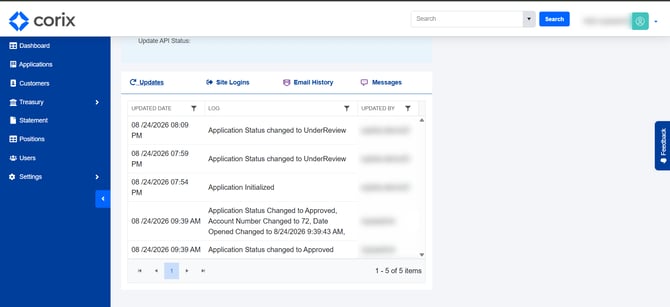
The audit log displays a history of actions taken on the application and related account records.
What events are recorded?
Depending on the action performed, the audit log may include events such as:
- Application status changes
- Account number changes
- Updates made during application processing
- Access to sensitive information
- Other administrative actions related to the application
Audit records help provide visibility into who performed an action and when it occurred.
Common uses
Administrators may use the audit log to:
- Review application history
- Support compliance reviews
- Investigate account changes
- Verify administrative actions
- Track access to sensitive information
Frequently asked questions
Can audit log entries be edited?
Audit logs are intended to provide a historical record of activity and are not typically modified.
Why don't I see a specific action in the audit log?
Visibility may depend on your permissions and the type of action being reviewed.
Is access to sensitive information recorded?
Yes. Actions such as unmasking protected information may be recorded in the audit log.